
12
December
Getting Started – Creating Your Account
December 12, 2025
Step-by-step guide to creating your 5minf2f.com account and accessing your dashboard.
Creating Your Account
Getting started with 5minf2f.com is quick and easy. Follow these steps to create your account and start accepting bookings.
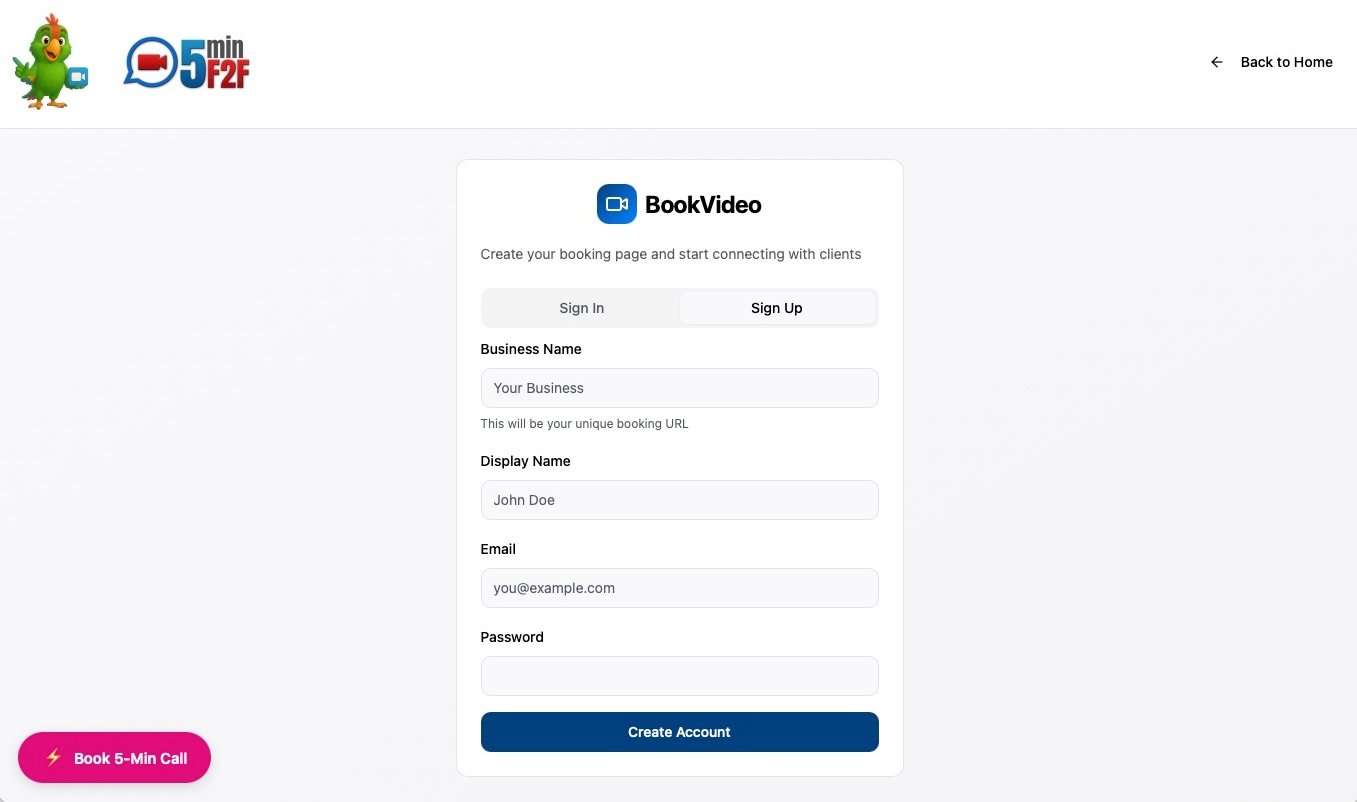
Sign Up Process
- Visit the Sign Up Page – Navigate to the registration page from the homepage
- Enter Your Information
– Email address (this will be your login)
– Secure password
– Business name
– Display name (how customers will see you) - Verify Your Email – Check your inbox for the verification email and click the confirmation link
- Complete Your Profile – Add additional details about your business
Email Verification
After signing up, you’ll receive a verification email. This step is important for account security and ensures we can send you booking notifications. If you don’t see the email:
- Check your spam/junk folder
- Verify you entered the correct email address
- Request a new verification email from the login page
First Login
Once your email is verified, log in with your credentials. You’ll be taken directly to your dashboard where you can:
- Complete your business profile
- Set up your availability schedule
- Customize your booking page
- View your unique booking URL
Security Best Practices
- Use a strong, unique password
- Keep your login credentials secure
- Don’t share your account access
- Log out when using shared devices
Need Help?
If you encounter any issues during sign-up, contact our support team or check the troubleshooting section of the knowledge base.