The Conversation Portal: Asynchronous Communication Made Easy
Learn how to use the Conversation Portal for seamless back-and-forth messaging without scheduling calls. Secure, private, and no account required for customers.
Introduction
The Conversation Portal is your hub for ongoing communication with customers—without the need for scheduled video calls. Whether you’re following up on a consultation, sharing documents, or answering questions, the portal keeps your conversations flowing naturally.
✨ Key Benefits
- No account required for customers—just click their secure link
- Private and secure token-based access
- File sharing built right in (images, PDFs, documents)
- Email notifications keep everyone in the loop
How It Works
The conversation flow is simple and intuitive:
- Customer initiates contact — They leave a message on your booking page or use the “Leave a Message” option
- You receive a notification — A new conversation appears in your Dashboard → Messages
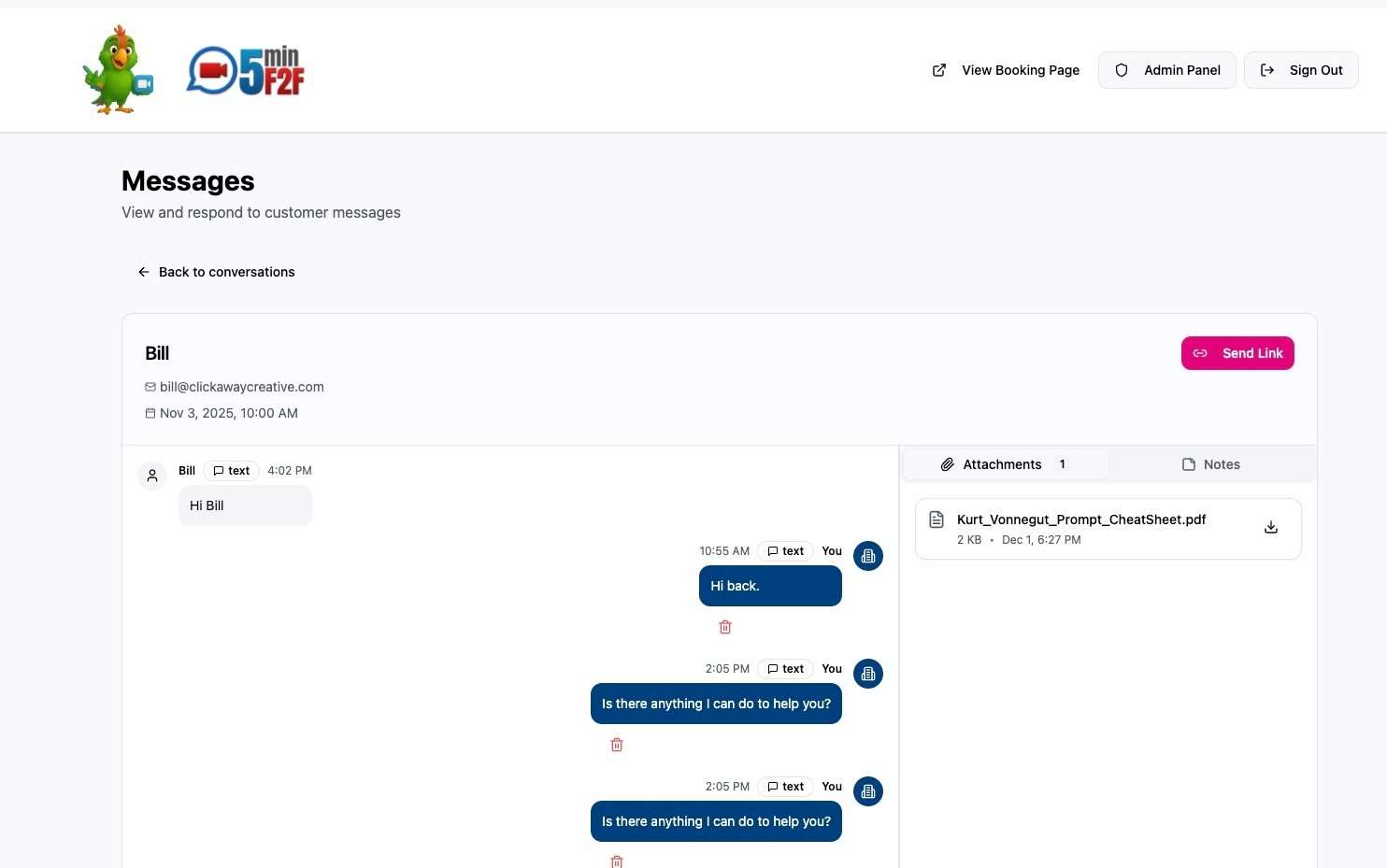
- You reply from your dashboard — Send text, attach files, or add internal notes
- Customer gets an email — Contains a secure link to view your reply and respond
- Conversation continues — Back and forth, at your own pace, for up to 60 days
For Business Owners
📬 Managing Conversations
|
Action |
How To |
|---|---|
|
View conversations |
Dashboard → Messages → Click any conversation |
|
Reply to customer |
Type in the message input and click Send |
|
Attach files |
Click the paperclip icon to upload files (max 10MB) |
|
View all attachments |
Use the Attachments tab in the right sidebar |
|
Add internal notes |
Use the Notes tab — only visible to you |
|
Send conversation link |
Click “Send Link” to email the customer their access link |
💡 Pro Tips for Businesses
-
Respond within 24 hours — Quick responses build trust and keep customers engaged
-
Use internal notes — Track customer preferences, follow-up items, or important context
-
Attach helpful resources — Share PDFs, images, or documents directly in the conversation
-
Mark messages as read — Keep your inbox organized by reviewing new messages promptly
For Customers
🔗 Accessing Your Conversation
|
What You Can Do |
Details |
|---|---|
|
Access via email link |
Click the secure link in any notification email |
|
No login required |
Your link is your access — private and secure |
|
Send messages |
Type and send text messages anytime |
|
Upload files |
Share images, PDFs, or documents (max 10MB each) |
|
Download attachments |
Click to download files shared by the business |
⚠️ Important: Link Expiration
- Conversation links expire after 60 days
- You’ll see a warning if your link expires in less than 7 days
- Need a new link? Contact the business to request one
Supported File Types
|
Category |
Supported Formats |
|---|---|
|
Images |
JPEG, PNG, WebP |
|
Documents |
PDF, Word (.doc, .docx) |
|
Size Limit |
10MB maximum per file |
Frequently Asked Questions
Why don’t customers need to log in?
Security is handled through unique, private tokens embedded in each conversation link. This means customers get instant access without the friction of creating an account, while keeping conversations completely private.
What happens after 60 days?
Conversation links expire for security. If you need continued access, simply contact the business and they can send you a fresh link.
Can I delete messages?
Only business owners can delete messages. This ensures proper record-keeping and prevents important information from being lost.
Are my files and messages private?
Absolutely. All files are stored securely and are only accessible to you and the business you’re communicating with. No one else can view your conversation.
Do I get notified of new messages?
Yes! Both businesses and customers receive email notifications when there’s new activity in the conversation.